
Who is this article for?
This article is intended for certified installers working with ABB energy meters and Maxem systems.
Why is this configuration important?
With a properly configured ABB B24 212-100, Maxem through the Energy Controller and Energy Cloud can:
-
Read the meter
-
Retrieve measurement data (e.g., from the main connection)
-
Apply Dynamic Load Management
If the meter is not configured correctly:
→ Maxem cannot establish communication, and DLM will not function.
Safety and Requirements
Always follow the safety guidelines provided by ABB and the installation environment.
-
Configuration must only be performed by qualified installers.
-
Always consult the official ABB B24 212-100 installation manual.
-
Ensure that both the kWh meter and the Maxem Energy Controller are correctly installed before beginning.
Required Materials
| Material / Tool | Description |
|---|---|
| ABB B24 212-100 installation manual: ABB Website | Reference for wiring and menu structure |
| Small flathead or Phillips screwdriver | For accessing terminal connections |
Preparation
Before starting, make sure:
-
The ABB B24 212-100 is correctly mounted and wired.
-
The Maxem Energy Controller is fully installed and configured.
-
RS485 cabling has been installed according to ABB specifications.
Modbus RS485 Terminal Layout (for clarity, not for configuration)
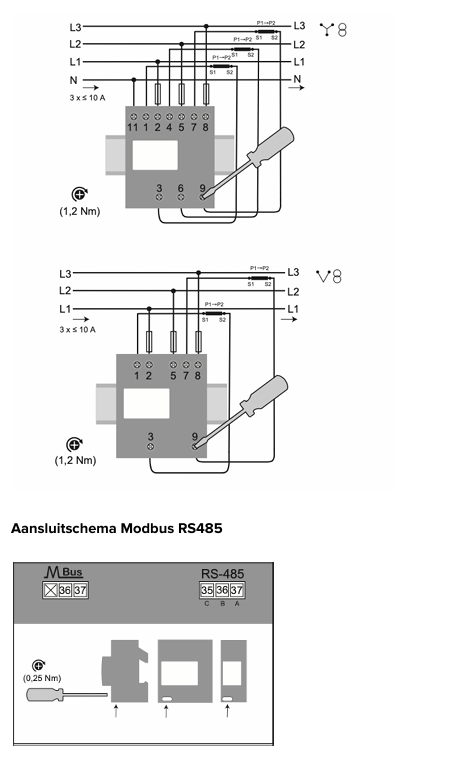
-
Terminal 35: C (ground)
-
Terminal 36: B
-
Terminal 37: A
Important: Always place a 120Ω termination resistor across terminals 36–37.
Step-by-Step Guide: Configuring the ABB B24 212-100 for Modbus RS485
Display Navigation
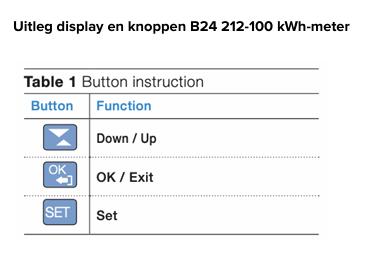
-
↑ / ↓ – navigate through menus or adjust values
-
OK / Exit – confirm (short press <1s) or exit a menu (press and hold 2s)
-
SET – opens the menu and starts configuration
1. Setting the Current Transformer (CT) Ratio
Setting the primary current (Prl)
-
Press SET → CT RAT appears.
-
Press OK → initial CT values appear (e.g., 5-5).
-
Press ↑/↓ until Prl is shown.
-
Press OK → default value appears (e.g., 5).
-
Press SET to modify → 0005 appears.
-
Adjust each digit with ↑/↓ and confirm with OK.
-
After the fourth digit, press OK to save.
-
Hold OK for 2 seconds to return to Prl.
Setting the secondary current (SEC)
-
Press ↑/↓ until SEC appears.
-
Press OK → default value appears (e.g., 5).
-
Press SET → the value begins to flash.
-
Adjust with ↑/↓ and confirm with OK.
-
Hold OK for 2 seconds to return to SEC.
-
Hold OK for 2 seconds again to return to CT RAT.
2. Configuring Modbus RS485 Settings
Open the RS485 menu
-
Press ↑/↓ until RS-485 appears.
-
Press OK → Prot appears.
Set the communication protocol
-
Press OK → verify that Modbus is displayed.
-
If not: press SET, adjust with ↑/↓, confirm with OK.
-
-
Hold OK for 2 seconds to return to Prot.
Set the baud rate (19200)
-
Press ↑/↓ until BAUD appears.
-
Press OK → check if 19200 is displayed.
-
If not: press SET, adjust with ↑/↓, confirm with OK.
-
-
Hold OK for 2 seconds to return to BAUD.
Set the Modbus address
-
Press ↑/↓ until Addres appears.
-
Press OK → default value is 001.
-
Set the agreed-upon Modbus address (unique per meter).
-
Adjust each digit with ↑/↓, confirm each digit with OK.
-
Hold OK for 2 seconds to return to Addres.
Set parity
-
Press ↑/↓ until PARITY appears.
-
Press OK → verify that EuEn (Even) is displayed.
-
If not: press SET, adjust with ↑/↓, confirm with OK.
3. Hold OK for 2 seconds to return to PARITY.
Exit the menu
-
Hold OK for 2 seconds → back to RS-485.
-
Hold OK for 2 seconds → back to INSTANT.
-
Hold OK for 2 seconds → back to the standard kWh display.
Configuration and Testing
After completing all settings:
-
Check in Maxem whether the Energy Controller is successfully communicating with the ABB meter.
No communication?
→ Repeat all steps and verify:
-
A/B/C wiring
-
120Ω termination resistor
-
Baud rate
-
Parity
-
Modbus address
Useful Documentation
Find the manual and additional documentation for the ABB B24 212-100 kWh meter on the ABB website: Link