
Maxem Energy Cloud (CPMS + EMS)
The Maxem Energy Cloud is Maxem's Charge Point Management System (CPMS), designed for both partners and customers (charge point owners). Each user receives an individual login that provides access to the charging infrastructure under their management.
The platform enables users to:
- Monitor and manage charging points remotely.
- View billing information and charging transactions.
- Manage charging sessions performed with both public and private charging cards.
- Configure charging tariffs and access settings.
- Receive reimbursement payments for charging sessions.
- Extend the platform with Energy Management Systems (EMS) for intelligent energy management and load balancing at a location.
How the Maxem Energy Cloud (CPMS) Works
The Maxem Energy Cloud acts as the central platform between charging points, charging card providers, and charge point owners.
Example Charging Session Flow
- A driver connects their vehicle to a charging point.
- The driver presents a charging card to the charging point.
- The charging point sends an authorization request to the Maxem Energy Cloud.
- The Maxem Energy Cloud validates the charging card.
- Authorization is granted and the charging session starts.
- During the charging session, the charging point continuously sends information such as energy consumption, charging status, and fault notifications to the platform.
- When the charging session ends, the Maxem Energy Cloud records the consumed energy and transaction details.
- The transaction information is forwarded to the driver's charging card provider (eMSP).
- The eMSP invoices the card owner (The user or their employer).
- Maxem receives the reimbursement from the eMSP and automatically pays the compensation to the charge point owner according to the configured tariffs.
Transactions, Invoices, and Subscriptions
These options are available in the left-hand menu when you log in or within an sub-organization.
1. Transactions
Provides an overview of all charging transactions, including:
-
Roaming transactions
-
Whitelist transactions
2. Invoices
Displays all reimbursement invoices generated from roaming transactions and paid to the charge point owner.
3. Subscriptions
Displays all active Maxem Energy Cloud subscriptions. Includes recurring platform service costs.
-
Subscriptions are shown per charging point.
-
If a charger has two charge points then it has two subscriptions on one charger.
Tree Structure
The Energy Cloud follows a hierarchical structure.
- Partner (Main organization):
- Views all customers (with their organizations, locations, charging points, users, and charging cards) added under them.
- Views all customers (with their organizations, locations, charging points, users, and charging cards) added under them.
-
Branch Office, Employee, or End Customer (Sub-organization)
- Views their own organizations, locations, charging points, users, and charging cards added under them.
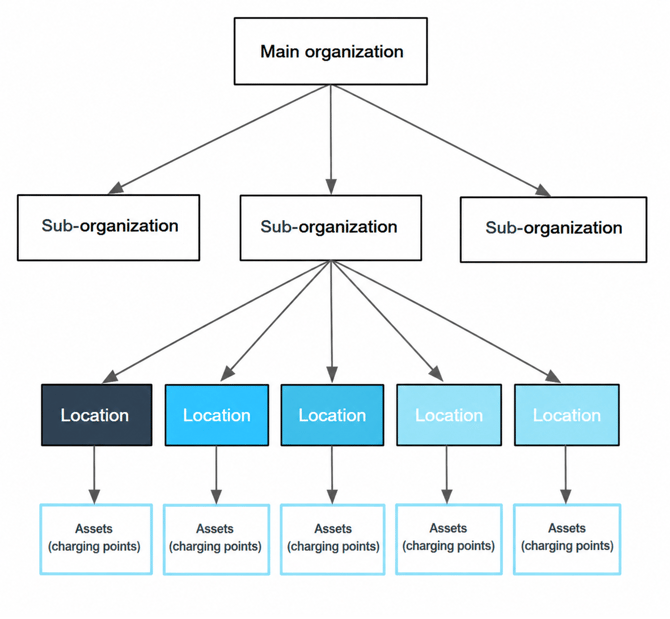
Sub-organization Structure
The structure can consist of multiple layers:
-
Organization(s)
-
One or more organizations.
-
-
Location(s)
-
One or more locations of the chargers within an organization.
-
-
Charging Point(s)
-
One or more charging points located at a specific location.
-
-
User(s)
-
One or more users within an organization.
-
-
Charging pass(es)
-
One or more charging cards assigned to a user.
-
Inherited Settings
Settings can be inherited from the layer above.
-
Tariffs
-
Locations can inherit tariffs from the organization.
-
Charging points can inherit tariffs from the location.
-
- Access Mode
- Charging points can inherit their access mode from the location.
Access Modes
The Energy Cloud supports different charging access configurations. These can be configured at both location and charging point level.
1. Open (Whitelist for everyone)
Any RFID charging card can start a charging session.
-
Charging costs are not passed on to the cardholder.
-
No reimbursement settlement takes place.
2. Restrict this Location to certain persons only. (Whitelist for certain pass holder)
Only approved charging cards can start a charging session.
-
Charging costs are not passed on to the cardholder.
-
No reimbursement settlement takes place.
-
Only cards included in the whitelist are authorized.
3. Set this Location to public charging. (Roaming)
The charging point is publicly accessible through roaming networks.
-
Charging costs are passed on to the cardholder. No need to ad the passes to the platform.
-
Reimbursements are automatically processed and paid out by Maxem.
-
Authorization is handled through roaming providers.
4. Set this Location to public charging. Allow certain users to charge for free. (Roaming & Whitelisting)
Combines public charging and private charging.
- Public charging cards are charged according to the configured tariff. No need to add the card to the platform.
- Reimbursements are automatically processed by Maxem.
- Whitelisted cards can charge free of charge.
Split Billing
The Maxem Energy Cloud supports split billing, allowing two separate payment flows between different bank accounts.
This is commonly used when an employer pays for the charging point subscription while an employee receives reimbursement for charging sessions at home.
- Main Organization (Company):
- Pays the subscription (usually the company or employer).
- Pays the subscription (usually the company or employer).
- Suborganization (Employee or client):
- Receives compensation as a private individual (usually the employee, who gets a charging point installed at home by the employer).
Charging Point Scenarios
Charging points can be added in two scenarios:
- Pre-approved for future installation:
- The charging point is not yet energized or connected to the platform but will be in the future. OCPP IDs (serial numbers) are reserved and used during onboarding.
- The charging point is not yet energized or connected to the platform but will be in the future. OCPP IDs (serial numbers) are reserved and used during onboarding.
- Energized and connected to the platform:
- The platform validates if the OCPP ID is properly connected.
Remote Actions
The Energy Cloud allows remote actions on two levels:
- At the Charging Point Level:
- Request status
- Activate
- Deactivate
- Full reset
- Request status
- At the Connector Level:
- Remote stop
- Request status
- Disconnect charging cable
- Activate
- Deactivate
- Remote stop
Self-Service for Partners
Partners can independently:
- Onboard customers.
- Create organizations.
- Create locations.
- Add charging points.
- Create users.
- Assign charging cards.
- Provide first-line support.
Partner Support & Profit Sharing:
- Self-service for Partners:
- Partners can onboard customers (organizations, locations, charging points, users, and charging cards) and provide first-line support.
- Partners can onboard customers (organizations, locations, charging points, users, and charging cards) and provide first-line support.
- Profit Sharing:
- Partners can apply roaming fees for charging with public charging cards and receive a kickback for charging point subscriptions.
- Partners can apply roaming fees for charging with public charging cards and receive a kickback for charging point subscriptions.
- Fixed Roaming Fee per Partner:
- A fixed roaming fee is applied to customers served by the partner, e.g., both customer "A" and "B" from partner "X" use the same roaming fee, but the kWh compensation can differ.
White-label Solutions
Maxem allows partners to fully white-label the platform.
This enables partners to:
- Use their own branding.
- Apply their own corporate identity.
- Position charging services under their own brand.
- Offer a branded charging management platform to their customers while leveraging Maxem's technology.
EMS
- Does your location has a net limit? Or do you want to expand with solar panels and batteries on your location? Extend the platform with Energy Management Systems (EMS) for intelligent energy management and load balancing at a location.
- Read more about EMS here: Link