
There are two ways on how to use a bank card or bank account for charging on your charging station:
- Bank card: It is not possible to setup paid roaming charging with only a bank card. However, you can set your bank card (RFID required) up as a whitelist card without payments for transactions.
- Money transfer: You can stick a QR code n on your charging station to pay the session by bank transfer.
Set your bank card up as a whitelist card
To set up your bank card for whitelisted transactions you need to find the invisible ID of your bank card and set it up as a charge pass in the cloud platform. The bank card needs to have the ability to use NFC/RFID (e.g. the pass enables contactless payments). You can use this method only for whitelisted charging sessions. It is not possible to setup paid roaming charging with only a bank card. In this article you can read how to add a card to the whitelist with the invisible ID: Link.
Payment through bank transfer
It is possible to create a QR code the client can scan to pay for a charging station through bank transfer. At the start of charging the bank will reserve an amount of money and when finishing charging the bank will process the amount you pay for the charging session.
These are the steps to set this up:
- To set this up send us a support ticket with the information on which location you want to turn online pay on for all the charging stations in one location.
- Once we turned online pay on you can use the QR code generated per charging station.
- Go to ‘Assets’ in the left menu and click on the asset. A QR code will be visible.
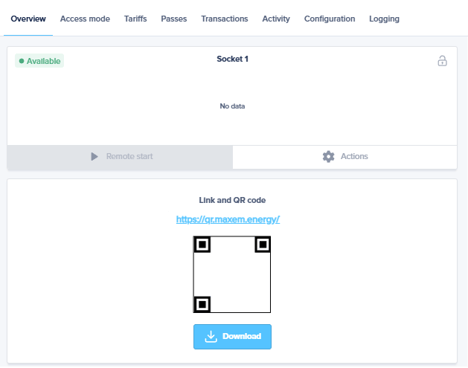
- Download the QR code as an image with the download button.
- Print out this QR code and stick it on the charging station