
The Maxem Energy Controller has 5 led indicators. In this article we describe what the indicators mean and how to troubleshoot when there is a problem with the controller. The Maxem controller requires a working internet connection with correct VPN settings to transmit the measurements.
(Note: led 4 and 5 are only for SCC controllers and home controllers. Those indicators are not used for Localproxy controllers)
1. No power
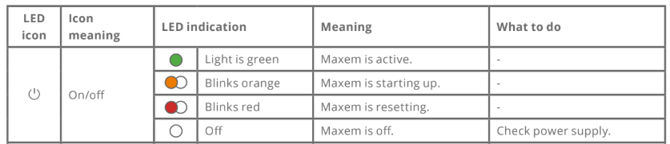
-
- LED is off. Check whether connected to power (wall outlet socket).
- LED is off. Check whether connected to power (wall outlet socket).
2. Not online
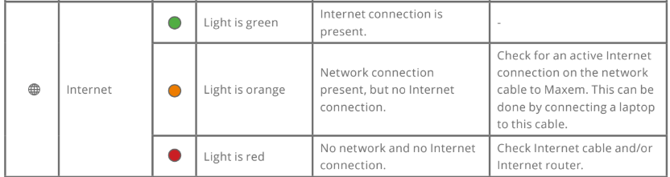
-
- Check whether the controller is connected correctly to internet via 4g router / or regular internet line.
- Led is orange:
- connected via LAN port. Check if the connection has an internet connection by connecting the cable to your laptop.
- The controller must dynamically receive an IP address from the on-site network via DHCP and the router must support MTU=1500, which indicates the packet size of the messages that should be able to be sent to our VPN server.
- Led is red: check internet cable or router
- Led is orange:
- Check whether the controller is connected correctly to internet via 4g router / or regular internet line.
3. VPN not connected
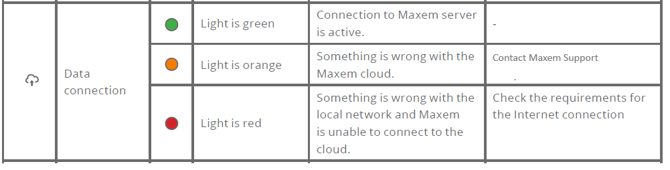
-
- Led is orange: Contact Maxem through a support ticket.
- Led is red: check firewall settings:
- The following network settings are required. Don’t be alarmed by the jargon, these are
normal network settings. In corporate networks some options can be blocked.
- The following network settings are required. Don’t be alarmed by the jargon, these are
-
-
-
- Maxem has to receive an IP address via DHCP.
- This IP address may not be in the following range: 10.40.0.0/16, 10.41.0.0/16., and 192.168.25.1/24.
- In case of a firewall outgoing traffic has to be allowed on the following ports: 853, 80, 123, 443, 1192 t/m 1200 en 9090.
- The firewall must not contain DNS rebind protection.
-
-
4. No meter values
(Note: only for SCC controllers and home controllers. Indicator 4 is not used for Localproxy controllers)

-
- Led is orange
- The configuration is not complete. Go to http//install.maxem.io to reconfigure.
- Led is red: Are meters connected in the right way?:
- Check if TCP is correctly installed with unmanaged switch in ETH port
- Is the RTU via RS1 port with 120 ohm resistance?
- Are meters configured correctly in accordance to meter installation instructions?
- Led is orange
5. No connection with assets
(Note: only for SCC controllers en home controllers. Indicator 5 is not used for Localproxy controllers)

-
- The configuration is not complete. Go to http//install.maxem.io to reconfigure.
- Led is red, there is no communication with the charging stations:
- check cabling to ethernet switch
- The cables should not be longer than 100m
- Does the asset have the correct backoffice url?
- The configuration is not complete. Go to http//install.maxem.io to reconfigure.
6. Controller is not visible in MEC
Contact Maxem to add controller to MEC